The Clubhouse Moment
Every multi-group golf event has the same scene late in the round. The early groups are in, beers are open, and everyone's trying to figure out where they stand — by passing one phone around, or by yelling "what'd you shoot?" across the patio. The leaderboard exists; it's just trapped on individual phones.
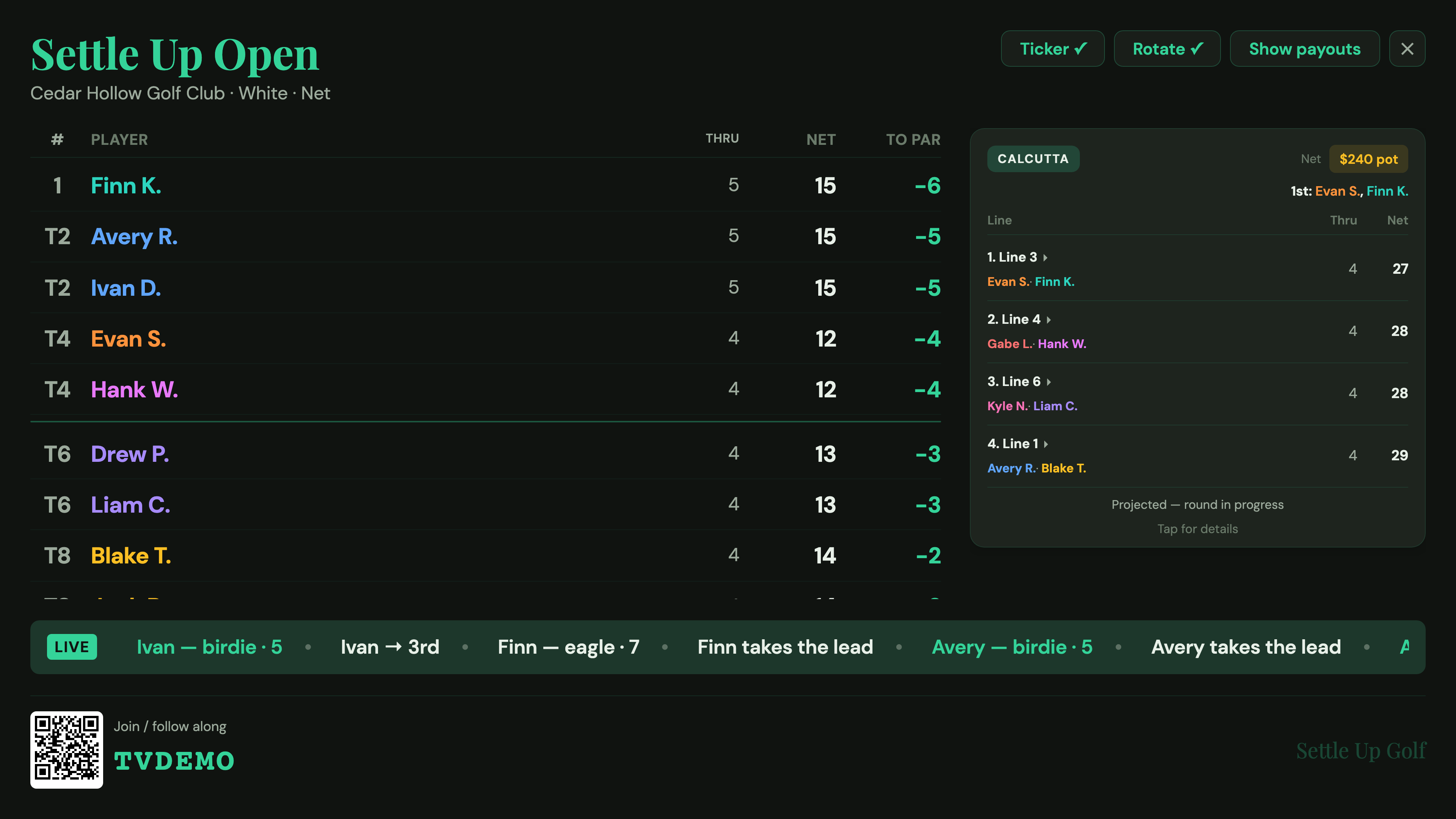
A TV leaderboard moves it to the wall. Settle Up Golf's Cast to TV turns any screen with a browser into a broadcast-style scoreboard: to-par standings across every group, the Calcutta line race, the pot, and a scrolling ticker that calls out birdies, eagles, and lead changes the instant they're entered out on the course. It's the difference between a tournament that happens and a tournament that feels like an event.
How a TV Leaderboard Actually Works
The important design decision is that it's web-based, because that's how clubhouse TVs actually get content. You don't need a dedicated scoreboard app, a special box, or any custom hardware. You need a browser on the screen. In practice that's one of three things:
- A laptop on HDMI. Plug a laptop into the TV, open the browser fullscreen. The most reliable option, and the one most clubs already have a cable for.
- A smart-TV browser. Many modern TVs have a built-in web browser — open it and go to the app.
- Cast a Chrome tab. From a computer, cast a single Chrome tab to a Chromecast or Google TV.
The host opens app.settleup-golf.com on that screen, logs into their account, opens the tournament's Board, and taps Cast to TV. Because the broadcast reads the same live data the scoring app uses, the screen re-ranks within seconds of any group's entry — no one ever has to refresh. The step-by-step cast guide covers the one trick worth knowing: if you're casting a Chrome tab, make the tab fullscreen so it fills the TV's 16:9, or the TV will frame it with black bars.
What's on the Screen
A good tournament scoreboard isn't just a list of names. The broadcast shows the things people actually look up at the TV for:
- The leaderboard. Every unit ranked by to-par, with thru counts. Ties are scored the way golf does it — T1, T1, 3, 4, T5 — not a flat numbered list. A big field pins the leaders at the top and rotates everyone else through, so it always fits on one screen.
- The Calcutta race. If you're running a Calcutta, the line standings and the total pot ride alongside the leaderboard so the room can root for their line.
- A live ticker. A scrolling chyron at the bottom calls out scoring as it lands — "birdie · 7," "eagle · 12," "takes the lead" — and even flags net birdies and eagles for handicap events.
Keep the Money Off the Screen
Money on a public screen is awkward. So payouts are hidden by default. The leaderboard, the Calcutta line race, and the total pot are all public — but the dollar figures, the per-line profit and loss, and the settle-up "who owes whom" are not. The host can tap Show payouts to reveal the money for a dramatic finish, then hide it again. The standings stay public; the wallets stay private until you decide otherwise.
It Knows Your Format
"Leaderboard" means different things in different events, and the broadcast adapts to each one rather than forcing everything into a single stroke list:
- Standard stroke play shows individual standings, net or gross.
- Multi-day events show cumulative standings across days, not just today's score.
- Member-guest and other pairs events show pair best-ball standings.
- Scrambles show one row per group rather than individuals.
- Team v. Team swaps the stroke list for a Ryder Cup-style team scoreboard — big team points, projected points, and the full match list showing who's up in each match.
Whatever you're playing, the screen shows the right unit, with the right scoring, automatically.
Why Web-Based Beats a Dedicated Scoreboard App
You could buy a standalone tournament-scoreboard product, mount a tablet, and reconcile two systems all afternoon. The catch is that a separate scoreboard needs separate data — somebody has to feed it scores, and now you're entering everything twice. Because Cast to TV is the same app your groups are already scoring in, there is exactly one source of truth. Scores entered on the course appear on the wall automatically, and the settle-up at the end is the same engine that drove the screen all day.
It's also free, it works on whatever screen the clubhouse already has, and there's nothing to install. For most weekend events, that's the whole pitch: better than crowding around a phone, simpler than buying a scoreboard, and live without anyone lifting a finger.
Setting It Up
If you can run a tournament in Settle Up Golf, you can cast it. Start a standard tournament, a scramble, a member-guest, or a Team v. Team event, share the code so each group scores on their own phone, and put one browser on the TV. The full walkthrough — including the fullscreen tip and the payouts toggle — is in How to cast your tournament to a TV. To get comfortable reading the standings on your phone first, see the live leaderboard guide.
Step-by-step with screenshots: How to cast your tournament to a TV →